Flow Chart Part 1





Welcome to Grade 11 ICT Lesson 01 – Flow Charts, a learning resource for students studying Information and Communication Technology (ICT) in Sri Lanka. This worksheet helps students understand flowchart symbols, algorithm design, and the steps used to solve programming problems. It is suitable for Grade 11 ICT lessons, homework, and examination revision.
A flow chart is a graphical representation of an algorithm. It uses standard symbols and arrows to show the sequence of steps required to solve a problem. Flowcharts make programming logic easier to understand before writing pseudocode or computer programs.
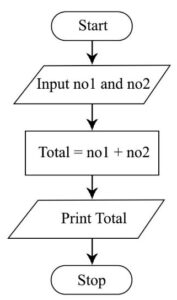
Common flowchart symbols include the oval for Start and End, the parallelogram for Input and Output, the rectangle for processing, and the diamond for decisions. Understanding these symbols is essential for learning Grade 11 ICT programming concepts.
This Grade 11 ICT Flow Chart Worksheet provides practice questions to help students develop logical thinking and problem-solving skills. Students can practise arranging instructions, identifying suitable flowchart symbols, accepting inputs, performing calculations, and displaying outputs.
The exercises support learning the sequence structure in programming and prepare students for more advanced topics, including selection and repetition. Try drawing each flowchart independently before checking the answers.
Looking for a Grade 11 ICT worksheet PDF for schoolwork or examination preparation? Download the flowchart worksheet provided on this page to practise drawing algorithms and applying the correct flowchart symbols.
This ICT programming worksheet is useful for individual study, classroom activities, homework, and revision. Students can save the PDF to a computer or mobile phone and practise the questions at any time.
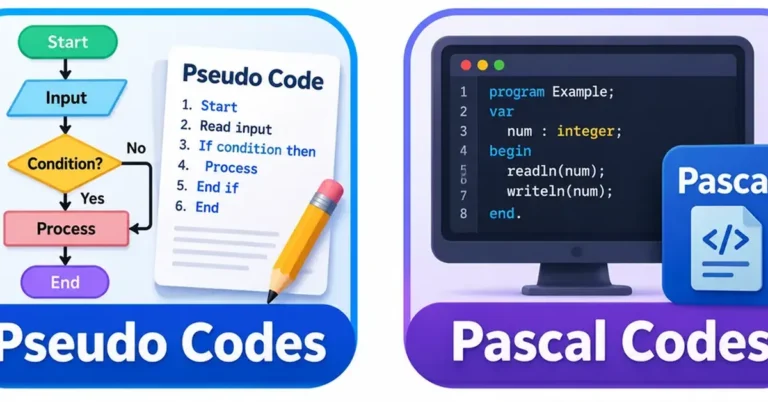
2. Write a Pseudo code & Pascal code to find the area of rectangle.
3. Write a Pseudo code & Pascal code to find the perimeter of rectangle.
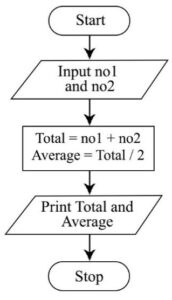
4. Write a Pseudo code & Pascal code to find the sum & average of two numbers.
5. Write a Pseudo code & Pascal code to find the perimeter of square.
6. Draw a Pseudo code & Pascal code to find the area of square.
7. Write a Pseudo code & Pascal code to find the sum & average of three numbers.
8. Write a Pseudo code & Pascal code to convert Fahrenheit degrees to Celsius degrees.
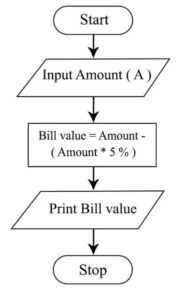
9. Write a Pseudo code & Pascal code to finding the value of product by giving 5% discount.
10. An Electric Meter Reader prepare the electricity bill by subtracting the current reading from the past reading & multiplying it by unit price. Draw a flow chart and write a Pseudo code & Pascal code to solve this problem.
Grade 11 ICT Lesson 01 – Sequence and Pseudocode Worksheet Welcome to Grade 11 ICT Lesson 01, designed for students studying Information and Communication Technology (ICT) in Sri Lanka. This lesson introduces the basic concepts of programming, algorithms, and sequence. Students can use this worksheet to practise writing instructions in the correct order and improve…

Grade 13 ICT Syllabus Sri Lanka – Lessons, Notes and Study Resources The Grade 13 ICT syllabus in Sri Lanka is an important part of the G.C.E. Advanced Level examination. It develops students’ theoretical knowledge and practical skills in programming, database management, web development and modern ICT applications. Main Topics in the Grade 13 ICT…

Grade 11 ICT Syllabus The Grade 11 ICT Syllabus is an important guide for students studying Information and Communication Technology in Sri Lanka. It helps students understand the subject areas they need to study and develop essential computer knowledge, programming skills, and digital literacy. On ictpastpaper.com, students can explore Grade 11 ICT lessons, study notes,…

Grade 10 ICT Syllabus Sri Lanka The Grade 10 ICT Syllabus is an important resource for students studying Information and Communication Technology in Sri Lanka. It introduces students to essential computer concepts, digital technologies, software applications, and practical ICT skills. Understanding the syllabus helps students organize their studies and prepare effectively for school examinations. On…
Grade 12 ICT Syllabus Sri Lanka – Lessons, Notes and Study Resources The Grade 12 ICT syllabus in Sri Lanka introduces students to important Information and Communication Technology concepts for the G.C.E. Advanced Level examination. Students can improve their knowledge by studying each lesson, practising questions and revising regularly. Main Topics in the Grade 12…